
 vrushal
a9dc12a5bf
vrushal
a9dc12a5bf
|
1 month ago | |
|---|---|---|
| .github | 1 month ago | |
| docs | 1 month ago | |
| docs_src | 1 month ago | |
| fastapi | 1 month ago | |
| scripts | 1 month ago | |
| tests | 1 month ago | |
| .gitignore | 2 months ago | |
| .pre-commit-config.yaml | 1 month ago | |
| .python-version | 6 months ago | |
| CITATION.cff | 2 years ago | |
| LICENSE | 8 years ago | |
| README.md | 1 month ago | |
| pyproject.toml | 1 month ago | |
| uv.lock | 1 month ago | |
README.md





FastAPI framework, high performance, easy to learn, fast to code, ready for production.
FOR DOCUMENTATION CLICK HERE
FOR SOURCE CODE CLICK HERE
What is FastAPI?:
FastAPI is a modern, fast (high-performance), web framework for building APIs with Python based on standard Python type hints.
Why use FastAPI?:
✅ Fast: One of the FASTEST PYTHON FRAMEWORK on par with NodeJS and Go (thanks to Starlette & Pydantic).
✅ Quick feature development : Increases feature development speed approximately by 200% to 300%.
✅ Less Bugs: Reduces human-induced bugs by approximately 40%.
✅ Intuitive: Comprehensive editor support. Completion everywhere. Minimized debugging time.
✅ Easy usability: Gentle learning curve. Easy to use.
✅ Simple Syntax: Minimize code duplication. Multiple features from each parameter declaration. Fewer bugs.
✅ Production-Ready & Robust: Get production-ready code. With automatic interactive documentation.
✅ Standards-Based Compliance: Based on (and fully compatible with) the open standards for APIs: OpenAPI (previously known as Swagger) and JSON Schema.
NOTE: Estimations are based on benchmarks conducted by an internal development team building production-scale applications.
Our Sponsors:
KEYSTONE SPONSOR:

GOLD SPONSORS:








SILVER SPONSORS:







OTHER SPONSORS
Testimonials ❤️:
-
"[...] I'm using FastAPI a ton these days. [...] I'm actually planning to use it for all of my team's ML services at Microsoft. Some of them are getting integrated into the core Windows product and some Office products."
Kabir Khan(Microsoft)[ref]
-
"We adopted the FastAPI library to spawn a REST server that can be queried to obtain predictions. [for Ludwig]"
Piero Molino, Yaroslav Dudin, and Sai Sumanth Miryala(Uber)[ref]
-
"Netflix is pleased to announce the open-source release of our crisis management orchestration framework: Dispatch! [built with FastAPI]"
Kevin Glisson, Marc Vilanova, Forest Monsen(Netflix)[ref]
-
"If anyone is looking to build a production Python API, I would highly recommend FastAPI. It is beautifully designed, simple to use and highly scalable, it has become a key component in our API first development strategy and is driving many automations and services such as our Virtual TAC Engineer."
Deon Pillsbury(Cisco)[ref]
FastAPI Conf:
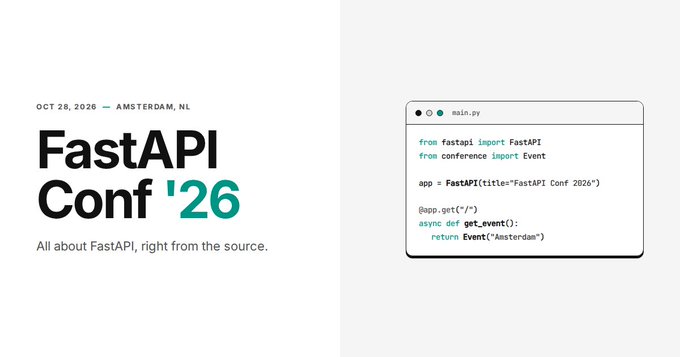
FastAPI Conf '26 is happening on October 28, 2026 in Amsterdam, NL. All about FastAPI, right from the source.
The RISE and RISE of FastAPI:

WATCH OUR MINI-DOCUMENTARY HERE
Typer:

- Typer is FastAPI's little sibling. And it's intended to be the FastAPI of CLIs.
- If you are building a CLI app to be used in the terminal instead of a web API, check out Typer.
Requirements:
FastAPI stands on the shoulders of giants:
Installation:
Create and activate a virtual environment and then install FastAPI:
$ pip install "fastapi[standard]"

---> 100%
NOTE: Make sure you put "fastapi[standard]" in quotes to ensure it works in all terminals.
Example:
CREATE:
Create a file main.py with:
from fastapi import FastAPI

app = FastAPI()


@app.get("/")
def read_root():
    return {"Hello": "World"}


@app.get("/items/{item_id}")
def read_item(item_id: int, q: str | None = None):
    return {"item_id": item_id, "q": q}
Or use async def
If your code uses async / await, use async def:
from fastapi import FastAPI

app = FastAPI()


@app.get("/")
async def read_root():
    return {"Hello": "World"}


@app.get("/items/{item_id}")
async def read_item(item_id: int, q: str | None = None):
    return {"item_id": item_id, "q": q}
NOTE: If you don't know, check the "In a hurry?" section about async and await in the docs.
RUN IT:
Run the server with:
$ fastapi dev

 ╭────────── FastAPI CLI - Development mode ───────────╮
 │                                                     │
 │  Serving at: http://127.0.0.1:8000                  │
 │                                                     │
 │  API docs: http://127.0.0.1:8000/docs               │
 │                                                     │
 │  Running in development mode, for production use:   │
 │                                                     │
 │  fastapi run                                        │
 │                                                     │
 ╰─────────────────────────────────────────────────────╯

INFO:     Will watch for changes in these directories: ['/home/user/code/awesomeapp']
INFO:     Uvicorn running on http://127.0.0.1:8000 (Press CTRL+C to quit)
INFO:     Started reloader process [2248755] using WatchFiles
INFO:     Started server process [2248757]
INFO:     Waiting for application startup.
INFO:     Application startup complete.
About the command fastapi dev
The command fastapi dev reads your main.py file automatically, detects the FastAPI app in it, and starts a server using Uvicorn.
By default, fastapi dev will start with auto-reload enabled for local development.
You can read more about it in the FastAPI CLI docs.
CHECK IT:
Open your browser at http://127.0.0.1:8000/items/5?q=somequery.
You will see the JSON response as:
{"item_id": 5, "q": "somequery"}
You already created an API that:
- Receives HTTP requests in the paths
/and/items/{item_id}. - Both paths take
GEToperations (also known as HTTP methods). - The path
/items/{item_id}has a path parameteritem_idthat should be anint. - The path
/items/{item_id}has an optionalstrquery parameterq.
INTERACTIVE API DOCS:
Now go to http://127.0.0.1:8000/docs.
You will see the automatic interactive API documentation (provided by Swagger UI):

ALTERNATIVE API DOCS:
And now, go to http://127.0.0.1:8000/redoc.
You will see the alternative automatic documentation (provided by ReDoc):

Example upgrade:
Now modify the file main.py to receive a body from a PUT request.
Declare the body using standard Python types, thanks to Pydantic.
from fastapi import FastAPI
from pydantic import BaseModel

app = FastAPI()


class Item(BaseModel):
    name: str
    price: float
    is_offer: bool | None = None


@app.get("/")
def read_root():
    return {"Hello": "World"}


@app.get("/items/{item_id}")
def read_item(item_id: int, q: str | None = None):
    return {"item_id": item_id, "q": q}


@app.put("/items/{item_id}")
def update_item(item_id: int, item: Item):
    return {"item_name": item.name, "item_id": item_id}
The fastapi dev server should reload automatically.
INTERACTIVE API DOCS UPGRADE:
Now go to http://127.0.0.1:8000/docs.
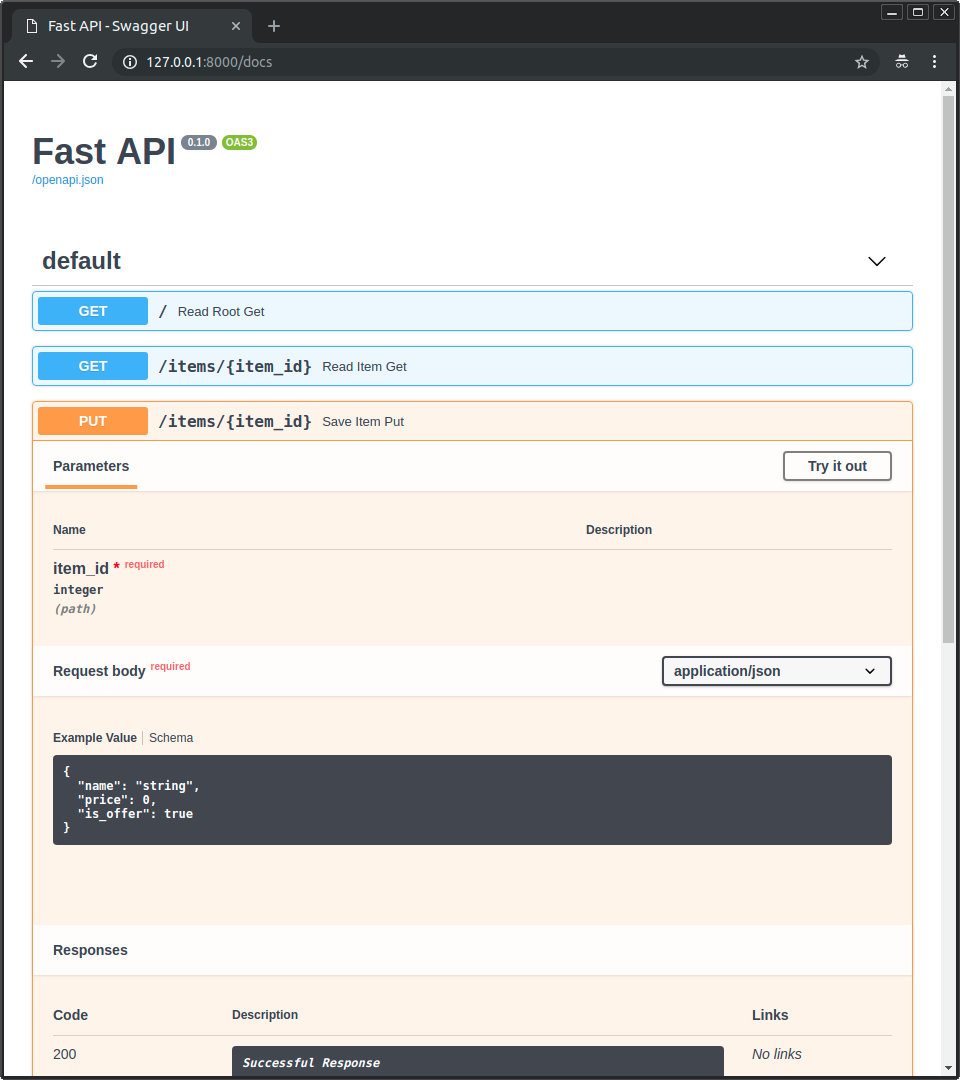
- The interactive API documentation will be automatically updated, including the new body:
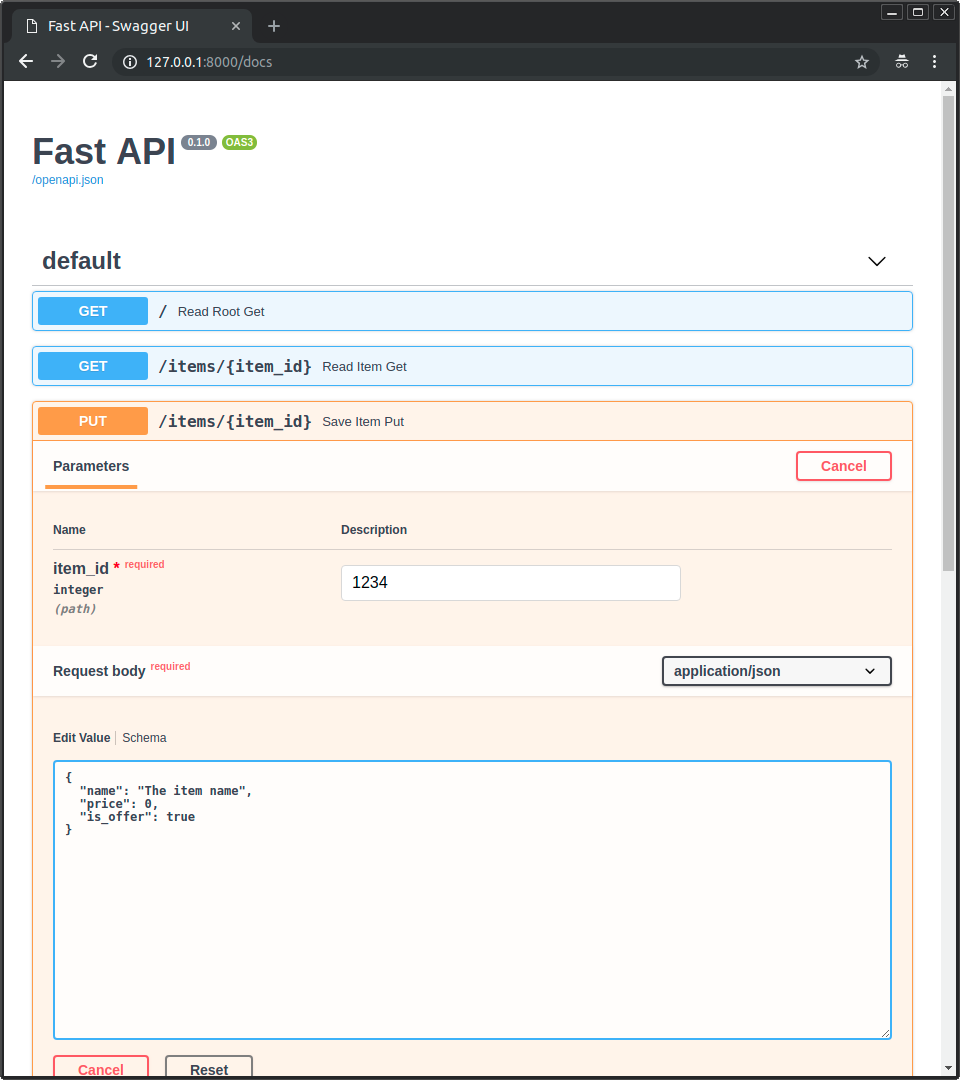
- Click on the button "Try it out", it allows you to fill the parameters and directly interact with the API:
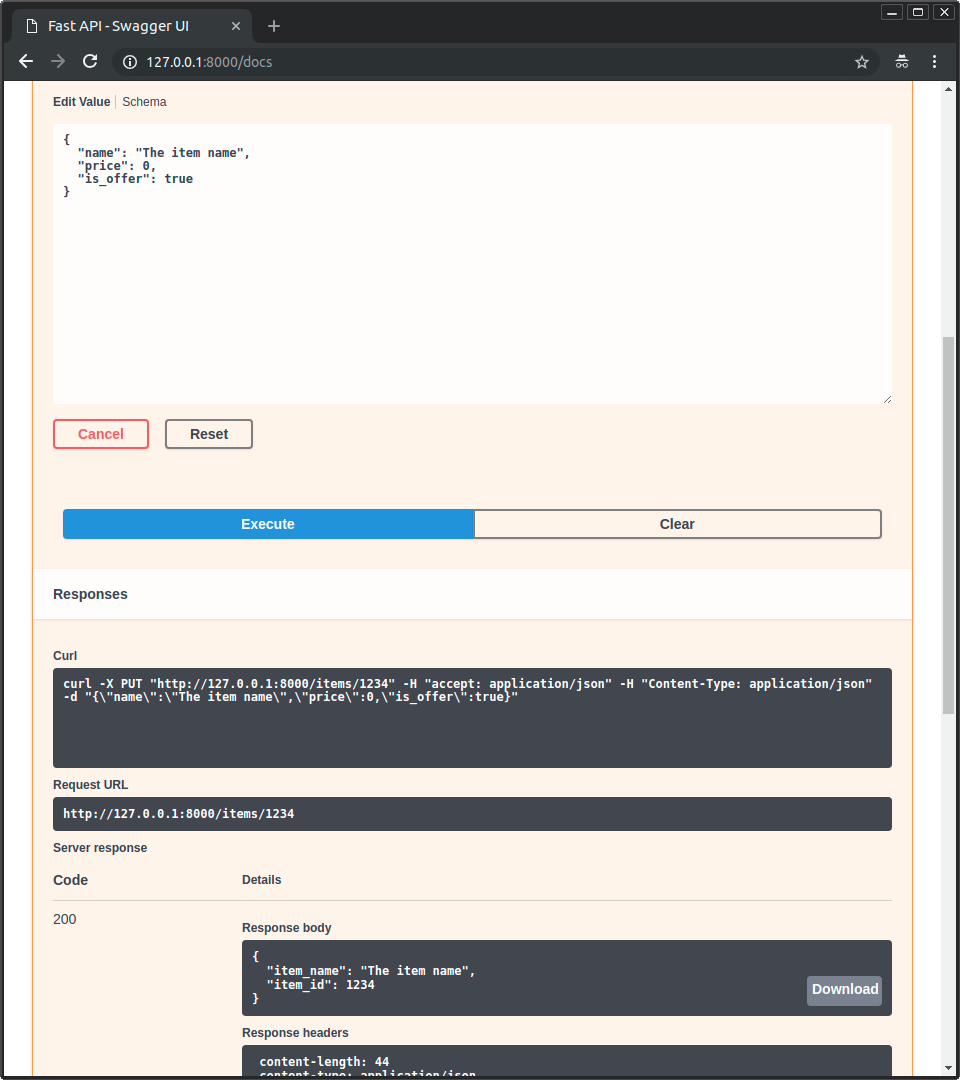
- Then click on the "Execute" button, the user interface will communicate with your API, send the parameters, get the results and show them on the screen:
ALTERNATIVE API DOCS UPGRADE:
And now, go to http://127.0.0.1:8000/redoc.
- The alternative documentation will also reflect the new query parameter and body:
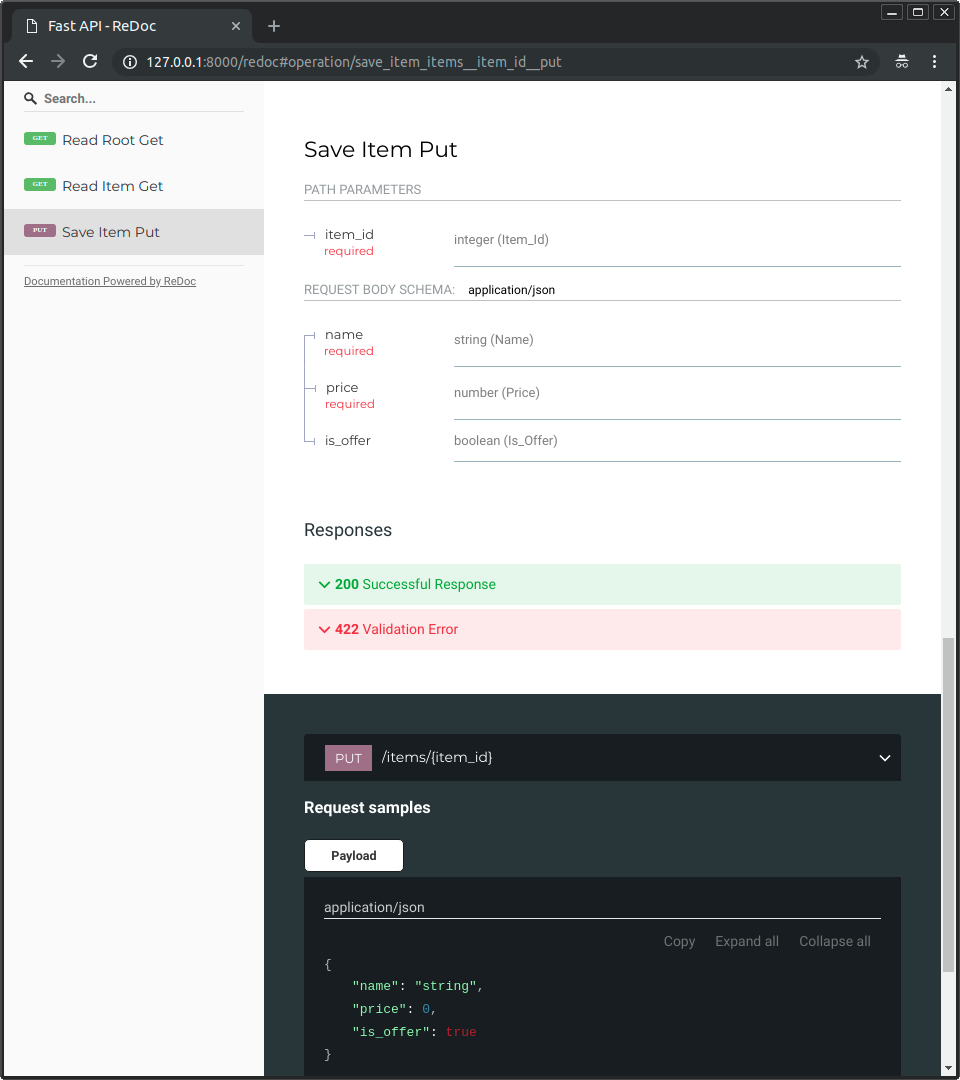
RECAP:
In summary, you declare once the types of parameters, body, etc. as function parameters. You do that with standard modern Python types. You don't have to learn a new syntax, the methods or classes of a specific library, etc.Just standard Python.
For example, for an int:
item_id: int
or for a more complex Item model:
item: Item
WITH THAT SINGLE DECLARATION YOU GET:
- Editor support, including: Completion, and Type checks.
- Validation of data:
- Automatic and clear errors when the data is invalid.
- Validation even for deeply nested JSON objects.
- Conversion of input data (coming from the network to Python data and types):
- Reading from: JSON, Path parameters, Query parameters, Cookies, Headers, Forms, and Files.
- Conversion of output data (converting from Python data and types to network data as JSON):
- Convert Python types (
str,int,float,bool,list, etc). datetimeobjects,UUIDobjects, and Database models, etc.
- Convert Python types (
- Automatic interactive API documentation, including 2 alternative user interfaces: Swagger UI and ReDoc.
BEHIND THE SCENES:
Coming back to the previous code example, FastAPI will:
- Validate Path Requirements: Validate that there is an
item_idin the path forGETandPUTrequests. - Enforce Parameter Types: Validate that the
item_idis of typeintforGETandPUTrequests. If it is not, the client will see a useful, clear error. - Handle Optional Queries: Check if there is an optional query parameter named
q(as inhttp://127.0.0.1:8000/items/foo?q=somequery) forGETrequests.As the
qparameter is declared with= None, it is optional. Without theNoneit would be required (as is the body in the case withPUT). - Parse and Verify Request Bodies: For
PUTrequests to/items/{item_id}, read the body as JSON and check that it has:- A required attribute
namethat should be astr. - A required attribute
pricethat has to be afloat. - An optional attribute
is_offer, that should be abool, if present. - Note: All this would also work for deeply nested JSON objects.
- A required attribute
- Automate JSON Serialization: Convert from and to JSON automatically.
- Standardize with OpenAPI: Document everything with OpenAPI, that can be used by interactive documentation systems and automatic client code generation systems, for many languages.
- Expose UI Interfaces: Provide 2 interactive documentation web interfaces directly.
We just scratched the surface, but you already get the idea of how it all works.
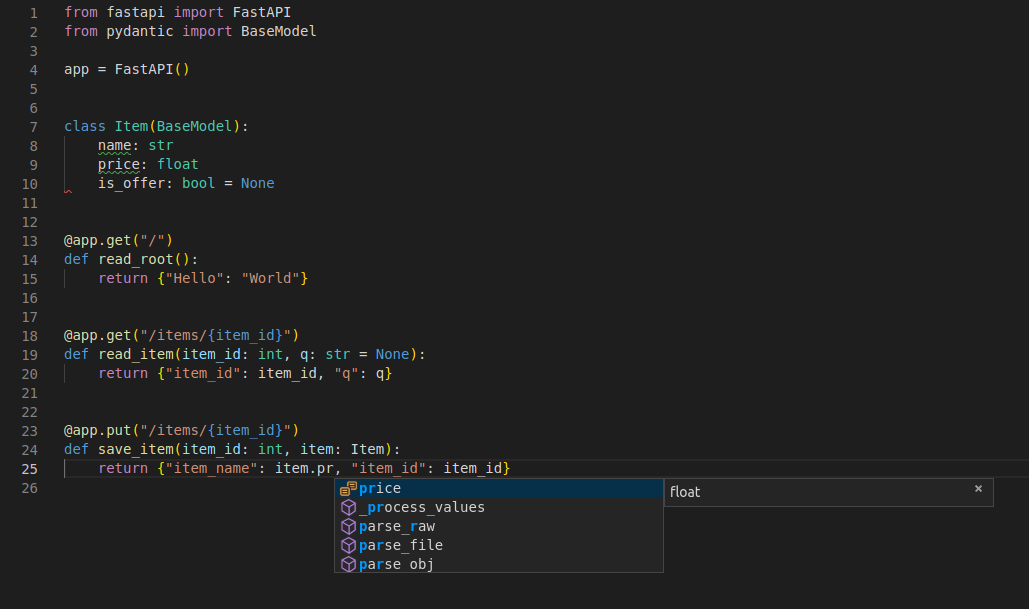
Try changing the line WITH:
return {"item_name": item.name, "item_id": item_id}
FROM:
... "item_name": item.name ...
TO:
... "item_price": item.price ...
And see how your editor will auto-complete the attributes and know their types:
FOR MORE COMPLETE EXAMPLE VISIT TUTORIAL.
SPOILER ALERT FOR TUTORIAL:
- Declaration of parameters from other different places such as: headers, cookies, form fields and files.
- How to set validation constraints such as
maximum_lengthorregex. - A very powerful and easy to use Dependency Injection system.
- Security and authentication, including support for OAuth2 with JWT tokens and HTTP Basic auth.
- More advanced (but equally easy) techniques for declaring deeply nested JSON models (thanks to Pydantic).
- GraphQL integration with Strawberry and other libraries.
- Many extra features (thanks to Starlette) such as: WebSockets, extremely easy tests based on HTTPX and
pytest, CORS, Cookie Sessions, etc.
DEPLOY YOUR APP (OPTIONAL):
You can optionally deploy your FastAPI app to FastAPI Cloud with a single command.
$ fastapi deploy

Deploying to FastAPI Cloud...

✅ Deployment successful!

🐔 Ready the chicken! Your app is ready at https://myapp.fastapicloud.dev
The CLI will automatically detect your FastAPI application and deploy it to the cloud. If you are not logged in, your browser will open to complete the authentication process.
That's it! Now you can access your app at that URL.
ABOUT FAST API CLOUD:
- FastAPI Cloud is built by the same author and team behind FastAPI.
- It streamlines the process of building, deploying, and accessing an API with minimal effort.
- It brings the same developer experience of building apps with FastAPI to deploying them to the cloud.
- FastAPI Cloud is the primary sponsor and funding provider for the FastAPI and friends open source projects.
DEPLOY TO OTHER CLOUD PROVIDERS:
- FastAPI is open source and based on standards. You can deploy FastAPI apps to any cloud provider you choose.
- Follow your cloud provider's guides to deploy FastAPI apps with them.
Performance:
- Independent TechEmpower benchmarks show FastAPI applications running under Uvicorn as one of the FASTEST Python frameworks available, only below Starlette and Uvicorn themselves (used internally by FastAPI). (*)
- To understand more about it, see the section Benchmarks.
Dependencies:
FastAPI depends on Pydantic and Starlette.
[A] standard DEPENDENCIES:
- When you install FastAPI with
pip install "fastapi[standard]"it comes with thestandardgroup of optional dependencies:
Used by Pydantic:
email-validator- for email validation.
Used by Starlette:
| Dependency | Purpose |
|---|---|
httpx |
Required if you want to use the TestClient. |
jinja2 |
Required if you want to use the default template configuration. |
python-multipart |
Required if you want to support form "parsing", with request.form(). |
Used by FastAPI:
uvicorn- for the server that loads and serves your application. This includesuvicorn[standard], which includes some dependencies (e.g.uvloop) needed for high performance serving.fastapi-cli[standard]- to provide thefastapicommand.- This includes
fastapi-cloud-cli, which allows you to deploy your FastAPI application to FastAPI Cloud.
- This includes
[B] WITHOUT standard DEPENDENCIES:
- If you don't want to include the
standardoptional dependencies, you can install withpip install fastapiinstead ofpip install "fastapi[standard]".
[C] WITHOUT fastapi-cloud-cli:
- If you want to install FastAPI with the standard dependencies but without the
fastapi-cloud-cli, you can install withpip install "fastapi[standard-no-fastapi-cloud-cli]".
[D] ADDITIONAL OPTIONAL DEPENDENCIES:
There are some additional dependencies you might want to install.
- Pydantic Extensions:
| Dependency | Purpose |
|---|---|
pydantic-settings |
For settings management. |
pydantic-extra-types |
For extra types to be used with Pydantic. |
- FastAPI Custom Responses:
| Dependency | Purpose |
|---|---|
orjson |
Required if you want to use ORJSONResponse. |
ujson |
Required if you want to use UJSONResponse. |
License:
Licensed under the MIT License.