
4.5 KiB
WireGuard Easy





You have found the easiest way to install & manage WireGuard on any Linux host!
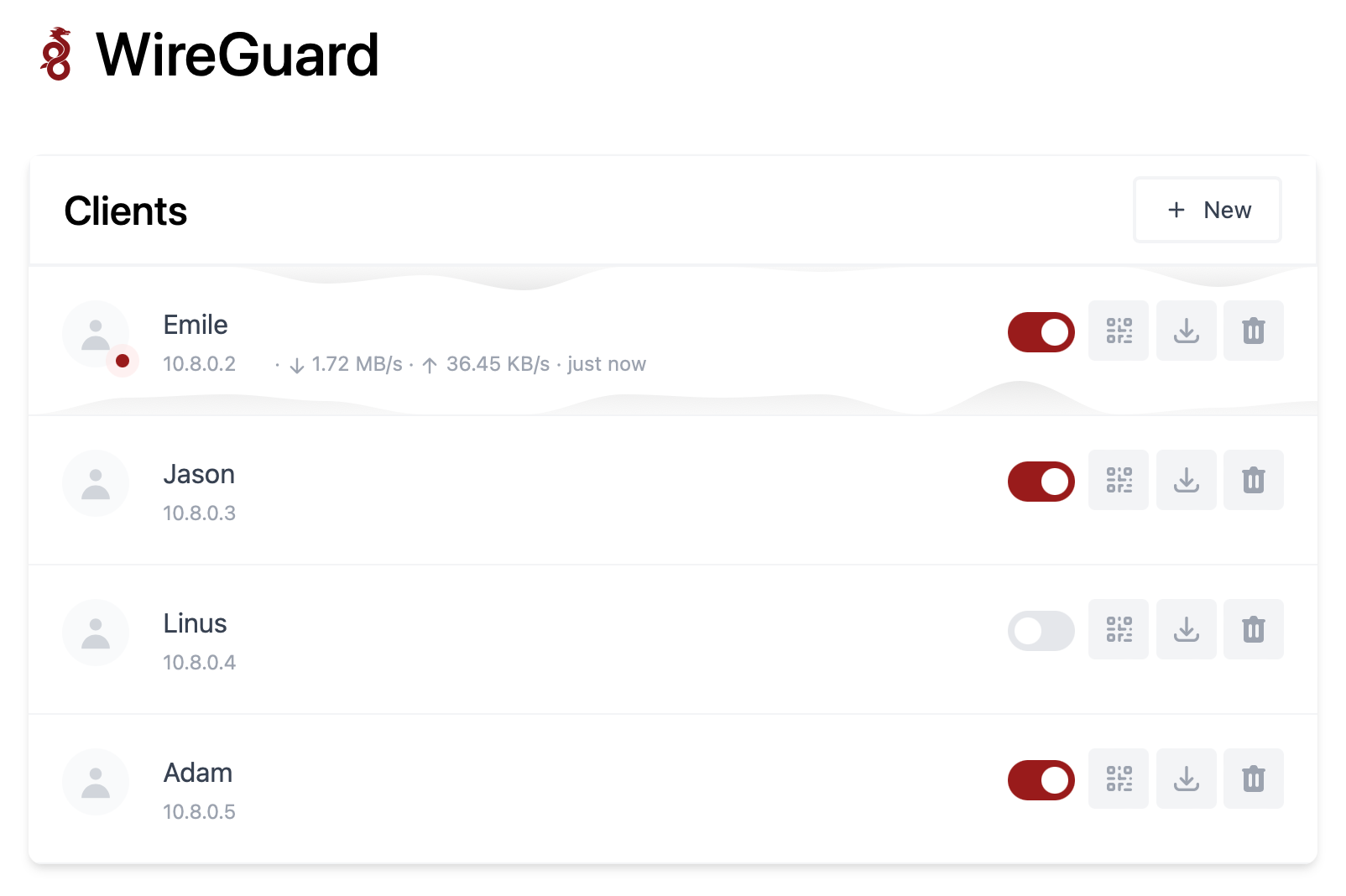
Features
- All-in-one: WireGuard + Web UI.
- Easy installation, simple to use.
- List, create, edit, delete, enable & disable clients.
- Show a client's QR code.
- Download a client's configuration file.
- Statistics for which clients are connected.
- Tx/Rx charts for each connected client.
- Gravatar support.
Requirements
- A host with a kernel that supports WireGuard (all modern kernels).
- A host with Docker installed.
Installation
1. Install Docker
If you haven't installed Docker yet, install it by running:
$ curl -sSL https://get.docker.com | sh
$ sudo usermod -aG docker $(whoami)
$ exit
And log in again.
2. Run WireGuard Easy
To automatically install & run wg-easy, simply run:
$ docker run -d \
  --name=wg-easy \
  -e WG_HOST=🚨YOUR_SERVER_IP \
  -e PASSWORD=🚨YOUR_ADMIN_PASSWORD \
  -v ~/.wg-easy:/etc/wireguard \
  -p 51820:51820/udp \
  -p 51821:51821/tcp \
  --cap-add=NET_ADMIN \
  --cap-add=SYS_MODULE \
  --sysctl="net.ipv4.conf.all.src_valid_mark=1" \
  --sysctl="net.ipv4.ip_forward=1" \
  --restart unless-stopped \
  weejewel/wg-easy
If you don't want to use docker, then add the sysctl tweaks listed above, and install wireguard, nodejs and npm from your package manager. After that, run the following
git clone https://github.com/WeeJeWel/wg-easy
cd wg-easy
mv src /app
cd /app
npm ci --production
cp node_modules ..
ufw allow 51821/tcp # (webui) Only for users of the UFW firewall
ufw allow 51820/udp # (wireguard listening port) Only for users of the UFW firewall
cd -
cp wg-easy.service /etc/systemd/system
nano /etc/systemd/system/wg-easy.service # Replace everything that is marked as 'REPLACEME' and tweak it to your liking
systemctl daemon-reload
systemctl enable --now wg-easy.service
systemctl start wg-easy.service
💡 Replace
YOUR_SERVER_IPwith your WAN IP, or a Dynamic DNS hostname.💡 Replace
YOUR_ADMIN_PASSWORDwith a password to log in on the Web UI.
The Web UI will now be available on http://0.0.0.0:51821.
💡 Your configuration files will be saved in
~/.wg-easy
3. Sponsor
Are you enjoying this project? Buy me a beer! 🍻
Options
These options can be configured by setting environment variables using -e KEY="VALUE" in the docker run command.
| Env | Default | Example | Description |
|---|---|---|---|
PASSWORD |
- | foobar123 |
When set, requires a password when logging in to the Web UI. |
WG_HOST |
- | vpn.myserver.com |
The public hostname of your VPN server. |
WG_PORT |
51820 |
12345 |
The public UDP port of your VPN server. WireGuard will always listen on 51820 inside the Docker container. |
WG_MTU |
null |
1420 |
The MTU the clients will use. Server uses default WG MTU. |
WG_PERSISTENT_KEEPALIVE |
0 |
25 |
Value in seconds to keep the "connection" open. |
WG_DEFAULT_ADDRESS |
10.8.0.x |
10.6.0.x |
Clients IP address range. |
WG_DEFAULT_DNS |
1.1.1.1 |
8.8.8.8, 8.8.4.4 |
DNS server clients will use. |
WG_ALLOWED_IPS |
0.0.0.0/0, ::/0 |
192.168.15.0/24, 10.0.1.0/24 |
Allowed IPs clients will use. |
WG_POST_UP |
... |
iptables ... |
See config.js for the default value. |
WG_POST_DOWN |
... |
iptables ... |
See config.js for the default value. |
If you change
WG_PORT, make sure to also change the exposed port.
Updating
To update to the latest version, simply run:
docker stop wg-easy
docker rm wg-easy
docker pull weejewel/wg-easy
And then run the docker run -d \ ... command above again.